Showing posts with label General Tech. Show all posts

Wednesday, April 23, 2014

General Tech Tool: ALEKS

Assessment and LEarning in Knowledge Spaces, better known as ALEKS, is a tool I am quite familiar with using, as we have been using it to support our math curriculum for the last three years. ALEKS has been used by our teachers and students as an independent curriculum and as a supplement to blended classrooms.


Overview


Name of Tech Tool: ALEKS

Brief Description of Tech Tool: From their website: Assessment and LEarning in Knowledge Spaces is a Web-based, artificially intelligent assessment and learning system. ALEKS uses adaptive questioning to quickly and accurately determine exactly what a student knows and doesn't know in a course. ALEKS then instructs the student on the topics she is most ready to learn. As a student works through a course, ALEKS periodically reassesses the student to ensure that topics learned are also retained. ALEKS courses are very complete in their topic coverage and ALEKS avoids multiple-choice questions. A student who shows a high level of mastery of an ALEKS course will be successful in the actual course she is taking.
ALEKS also provides the advantages of one-on-one instruction, 24/7, from virtually any Web-based computer for a fraction of the cost of a human tutor.

Technical Costs & Considerations: ALEKS is a subscription based service with a variety of subscription options, each with their own price point: Ordering and Subscriptions. Some courses require Java, while others are accessible to a wide range of operating systems including iPads

Additional Information

ALEKS can be used as a standalone curriculum or in conjunction with your own curriculum. ALEKS has been successful in K-12 and in Higher Ed scenarios, as well as homeschool use. Teachers can align ALEKS use to their current textbooks and curriculum along with the CCSSM and set specific learning goals for the student. Teachers can also create their own quizzes with specific topics, or select assessments that cover recently completed material or the whole course.

Students do well working around their pie like a clock and working from top-to-bottom within each pie slice. As we all know, mathematics tends to build on itself and while students may be successful jumping from one slice to the next, they will likely reach a point where they can no longer access certain pie pieces because they do not have the prerequisite knowledge to continue on.

ALEKS provides open ended questions that require students to work on developing their skills, instead of simply guessing and checking with multiple choice questions. Students can use the "Explain" feature (which is customizable by teachers) to walk through the steps of each problem.

Helpful Links from ALEKS:


How ALEKS Supports and Supplements PBL/PrBL
ALEKS is another great tool to support a blended-PBL mathematics classroom. I use this tool as my procedural practice for my students, and I supplement that procedural practice with both PrBL and PBL in the classroom. I find that my students are able to easily use the system and enjoy working at their own pace. ALEKS provides the procedural practice and ACT prep that I would otherwise have a difficult time implementing in a PBL classroom. While there are no multiple choice questions, students are getting exposure to story problems and procedural practice problems similar to those that they see on high-stakes testing, which alleviates some of the trepidations teachers have when moving to a PBL/PrBL modeled mathematics classroom.

General Tech Tool: SketchUp

This next tech tool is one that I have never used personally, but that I have had many students use quite successfully. This tool has been extremely valuable to my students for creating 3D models of final product designs that are either too big or too costly to create the physical model for. Students are able to take a number of ideas into consideration and play around with their model to see the feasibility of it. The 360 viewpoint is also a key asset as it helps to establish a reality for the product created with the tool. As I have not used the tool myself, I will first let a classmate of mine, William S. evaluate the tool and then I'll get into the uses in a PBL classroom


Overview

Curator: William S.


Name of Tech Tool: SketchUp


Brief Description of Tech Tool: SketchUp is a free application for doing 3D modeling. It's intended as a tool for designing things (e.g., houses, sculptures, toys), but can also be used to support teaching and learning of some geometry.
(It was previously Google SketchUp but it is now Trimble SketchUp).


Additional Information

Add links to information about the tool, ideas for activities, etc.


Getting Started with SketchUp

  1. Download the SketchUp application from http://www.sketchup.com/intl/en/download/. The free version works fine. Be sure to download the appropriate version for your operating system.
  2. Install SketchUp on your computer and launch it.
  3. Explore.
    1. Find video tutorials on how to use SketchUp at http://sketchup.google.com/intl/en/training/videos.html
    2. Find video tutorials on using SketchUp to draw 2D and 3D figures at http://mathforum.org/sketchup/videos.html


SketchUp Resources


Student Example

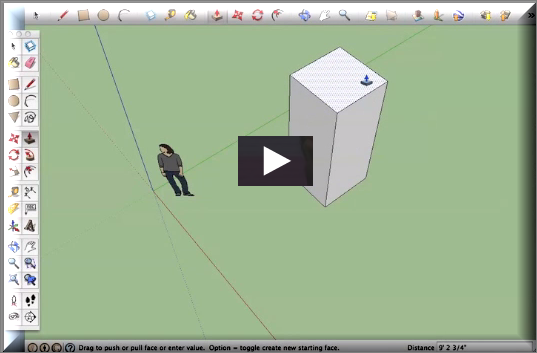
Here's a demonstration of slicing prisms by a 6th-grade student using SketchUp. These demos were created in conjunction with activities being field tested for CMP (Connected Math) curriculum.

external image d8wTaBEuDN3w7lUq-8UpasGbW_HdgTS3yHzwn1L1fu8ckK5WkXMpoKkxR-W3RatCxH6EPg7eKu1gRqlo3vh47uMpNqkx57aaLRvEkWUKFVuFL_O7wsJSrmXF

How SketchUp Supports and Supplements PBL/PrBL

SketchUp provides a dynamic modeling tool to create some phenomenal 3D structures. This tool is instrumental to my students in creating mock-ups of the final products they are choosing to create for their projects, and will prove invaluable to me next year when I teach "The Art & Architecture of Geometry" as a math elective. This tool could be used in a number of ways with various Problems or Projects, but due to the complexity and intricacy that SketchUp supports, I find it best for full-scale projects, as students tend to get wrapped-up in the tool and want longer times to work with it. 

General Tech Tool: Khan Academy

Khan Academy is something that I couldn't live without as a PBL educator. In a PBL math classroom, we are often torn between digger deeper conceptually with the mathematics in the project and needing to make sure our students have procedural fluency. Khan Academy provides me with just what I need to help my students get the best of both worlds.

Overview


Name of Tech Tool: Khan Academy

Brief Description of Tech Tool: Khan Academy is an online resource that has instructional and educational videos on a wide variety of topics, form micro-economics to astrophysics, cryptology and beyond. Khan Academy is most frequently associated with mathematics learning as it provides not only video instruction assistance, but procedural practice in a wide array of skills from middle elementary through trigonometry and beyond.

Technical Costs & Considerations: Users will need access to technology and the internet to access the site. If using it with students, it is a good idea to have students signed up with their individual emails. This is particularly easy if your school uses Google emails. Students will also need access to YouTube since videos are streamed through that service.

Additional Information

Khan Academy users are able to track their individual progress, "level-up" their mastery and earn badges of accomplishment throughout their learning endeavors. Teachers, parents and coaches can track this progress on the back-end and assign specific topics and videos to their students to master.

You can create your own classes in Khan Academy and track any number of students assigned to various learning plans. You can even customize what your students are working on and set dates for when it should be completed as means of differentiation and extension. Then view their stats to see how many attempts they made and adjust your assignments from there. Statistics show student mastery level in addition to this other information, helping you to see how well your student has mastered the procedures.

Helpful Links from Khan Academy:

How Khan Academy Supports and Supplements PBL/PrBL
Khan Academy is an awesome supplement to a blended-PBL classroom of any kind, but I particularly appreciate it for mathematics. When working on projects, I can direct my students to specific videos that will help them to learn and practice the procedures they need in order to best utilize the concepts they are developing throughout the project. I can also create customized playlists for each student that includes just what that individual student needs to cover and nothing they don't.